Source: Aoai Solution · GitHub · microsoft/generative-ai-for-beginners Authors: Microsoft (microsoft) Licence: MIT — https://spdx.org/licenses/MIT.html
In order to run the following notebooks, if you haven't done yet, you need to deploy a model that uses text-embedding-ada-002 as base model and set the deployment name inside .env file as AZURE_OPENAI_EMBEDDINGS_ENDPOINT
import os
import pandas as pd
import numpy as np
from openai import AzureOpenAI
from dotenv import load_dotenv

load_dotenv()

client = AzureOpenAI(
  api_key=os.environ['AZURE_OPENAI_API_KEY'],  # this is also the default, it can be omitted
  api_version = "2024-10-21",
  azure_endpoint = os.environ['AZURE_OPENAI_ENDPOINT']
  )

model = os.environ['AZURE_OPENAI_EMBEDDINGS_DEPLOYMENT']

SIMILARITIES_RESULTS_THRESHOLD = 0.75
DATASET_NAME = "../embedding_index_3m.json"
Next, we are going to load the Embedding Index into a Pandas Dataframe. The Embedding Index is stored in a JSON file called embedding_index_3m.json. The Embedding Index contains the Embeddings for each of the YouTube transcripts up until late Oct 2023.
def load_dataset(source: str) -> pd.core.frame.DataFrame:
    # Load the video session index
    pd_vectors = pd.read_json(source)
    return pd_vectors.drop(columns=["text"], errors="ignore").fillna("")
Next, we are going to create a function called get_videos that will search the Embedding Index for the query. The function will return the top 5 videos that are most similar to the query. The function works as follows:
- First, a copy of the Embedding Index is created.
- Next, the Embedding for the query is calculated using the OpenAI Embedding API.
- Then a new column is created in the Embedding Index called
similarity. Thesimilaritycolumn contains the cosine similarity between the query Embedding and the Embedding for each video segment. - Next, the Embedding Index is filtered by the
similaritycolumn. The Embedding Index is filtered to only include videos that have a cosine similarity greater than or equal to 0.75. - Finally, the Embedding Index is sorted by the
similaritycolumn and the top 5 videos are returned.
def cosine_similarity(a, b):
    if len(a) > len(b):
        b = np.pad(b, (0, len(a) - len(b)), 'constant')
    elif len(b) > len(a):
        a = np.pad(a, (0, len(b) - len(a)), 'constant')
    return np.dot(a, b) / (np.linalg.norm(a) * np.linalg.norm(b))

def get_videos(
    query: str, dataset: pd.core.frame.DataFrame, rows: int
) -> pd.core.frame.DataFrame:
    # create a copy of the dataset
    video_vectors = dataset.copy()

    # get the embeddings for the query
    query_embeddings = client.embeddings.create(input=query, model=model).data[0].embedding

    # create a new column with the calculated similarity for each row
    video_vectors["similarity"] = video_vectors["ada_v2"].apply(
        lambda x: cosine_similarity(np.array(query_embeddings), np.array(x))
    )

    # filter the videos by similarity
    mask = video_vectors["similarity"] >= SIMILARITIES_RESULTS_THRESHOLD
    video_vectors = video_vectors[mask].copy()

    # sort the videos by similarity
    video_vectors = video_vectors.sort_values(by="similarity", ascending=False).head(
        rows
    )

    # return the top rows
    return video_vectors.head(rows)
This function is very simple, it just prints out the results of the search query.
def display_results(videos: pd.core.frame.DataFrame, query: str):
    def _gen_yt_url(video_id: str, seconds: int) -> str:
        """convert time in format 00:00:00 to seconds"""
        return f"https://youtu.be/{video_id}?t={seconds}"

    print(f"\nVideos similar to '{query}':")
    for _, row in videos.iterrows():
        youtube_url = _gen_yt_url(row["videoId"], row["seconds"])
        print(f" - {row['title']}")
        print(f"   Summary: {' '.join(row['summary'].split()[:15])}...")
        print(f"   YouTube: {youtube_url}")
        print(f"   Similarity: {row['similarity']}")
        print(f"   Speakers: {row['speaker']}")
- First, the Embedding Index is loaded into a Pandas Dataframe.
- Next, the user is prompted to enter a query.
- Then the
get_videosfunction is called to search the Embedding Index for the query. - Finally, the
display_resultsfunction is called to display the results to the user. - The user is then prompted to enter another query. This process continues until the user enters
exit.
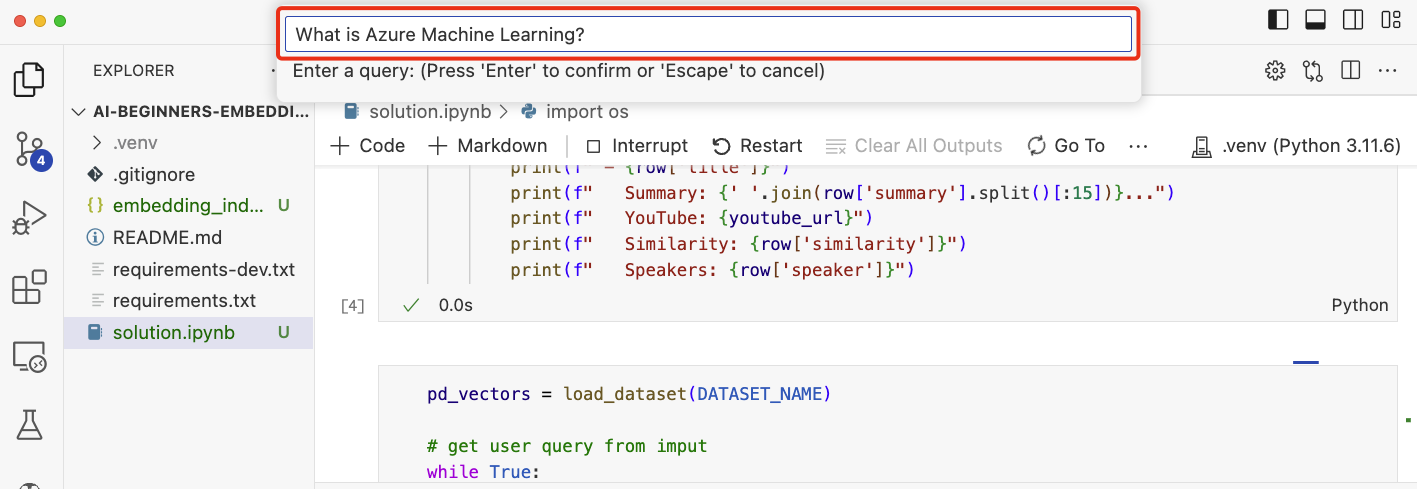
You will be prompted to enter a query. Enter a query and press enter. The application will return a list of videos that are relevant to the query. The application will also return a link to the place in the video where the answer to the question is located.
Here are some queries to try out:
- What is Azure Machine Learning?
- How do convolutional neural networks work?
- What is a neural network?
- Can I use Jupyter Notebooks with Azure Machine Learning?
- What is ONNX?
pd_vectors = load_dataset(DATASET_NAME)

# get user query from input
while True:
    query = input("Enter a query: ")
    if query == "exit":
        break
    videos = get_videos(query, pd_vectors, 5)
    display_results(videos, query)