Build text generation apps
Source: Githubmodels Assignment · GitHub · microsoft/generative-ai-for-beginners Authors: Microsoft (microsoft) Licence: MIT — https://spdx.org/licenses/MIT.html
You've seen so far through this curriculum that there are core concepts like prompts and even a whole discipline called "prompt engineering". Many tools you can interact with like ChatGPT, Office 365, Microsoft Power Platform and more, support you using prompts to accomplish something.
For you to add such an experience to an app, you need to understand concepts like prompts, completions and choose a library to work with. That's exactly what you'll learn in this chapter.
Introduction
In this chapter, you will:
- Learn about the openai library and its core concepts.
- Build a text generation app using openai.
- Understand how to use concepts like prompt, temperature, and tokens to build a text generation app.
Learning goals
At the end of this lesson, you'll be able to:
- Explain what a text generation app is.
- Build a text generation app using openai.
- Configure your app to use more or less tokens and also change the temperature, for a varied output.
What is a text generation app?
Normally when you build an app it has some kind of interface like the following:
- Command-based. Console apps are typical apps where you type a command and it carries out a task. For example,
gitis a command-based app. - User interface (UI). Some apps have graphical user interfaces (GUIs) where you click buttons, input text, select options and more.
Console and UI apps are limited
Compare it to a command-based app where you type a command:
- It's limited. You can't just type any command, only the ones that the app supports.
- Language specific. Some apps support many languages, but by default the app is built for a specific language, even if you can add more language support.
Benefits of text generation apps
So how is a text generation app different?
In a text generation app, you have more flexibility, you're not limited to a set of commands or a specific input language. Instead, you can use natural language to interact with the app. Another benefit is that because you're already interacting with a data source that has been trained on a vast corpus of information, whereas a traditional app might be limited on what's in a database.
What can I build with a text generation app?
There are many things you can build. For example:
- A chatbot. A chatbot answering questions about topics, like your company and its products could be a good match.
- Helper. LLMs are great at things like summarizing text, getting insights from text, producing text like resumes and more.
- Code assistant. Depending on the language model you use, you can build a code assistant that helps you write code. For example, you can use a product like GitHub Copilot as well as ChatGPT to help you write code.
How can I get started?
Well, you need to find a way to integrate with an LLM which usually entails the following two approaches:
- Use an API. Here you're constructing web requests with your prompt and get generated text back.
- Use a library. Libraries help encapsulate the API calls and make them easier to use.
Libraries/SDKs
There are a few well known libraries for working with LLMs like:
- openai, this library makes it easy to connect to your model and send in prompts.
Then there are libraries that operate on a higher level like:
- Langchain. Langchain is well known and supports Python.
- Semantic Kernel. Semantic Kernel is a library by Microsoft supporting the languages C#, Python, and Java.
First app using Microsoft Foundry Models Playground and Azure AI Inference SDK
Let's see how we can build our first app, what libraries we need, how much is required and so on.
Note: GitHub Models is retiring at the end of July 2026. The steps below have been updated to use Microsoft Foundry Models, which offers the same "explore, try in a playground, and call with an API key" experience GitHub Models offered, now hosted directly in the Microsoft Foundry portal. Prefer to work fully offline instead? See Foundry Local for running models on your own device, no cloud subscription required.
What is Microsoft Foundry Models?
Welcome to Microsoft Foundry Models! The Foundry model catalog gives you a single place to explore and try hundreds of AI models - from OpenAI, Meta, Mistral, Cohere, Microsoft, and more - hosted on Azure, all accessible via a free playground and, once deployed, callable from your favorite code IDE.
What do I need?
- A Microsoft account and an Azure subscription (a free account works)
- A Microsoft Foundry project
Lets get started!
Find a model and test it
Navigate to the Microsoft Foundry Models catalog
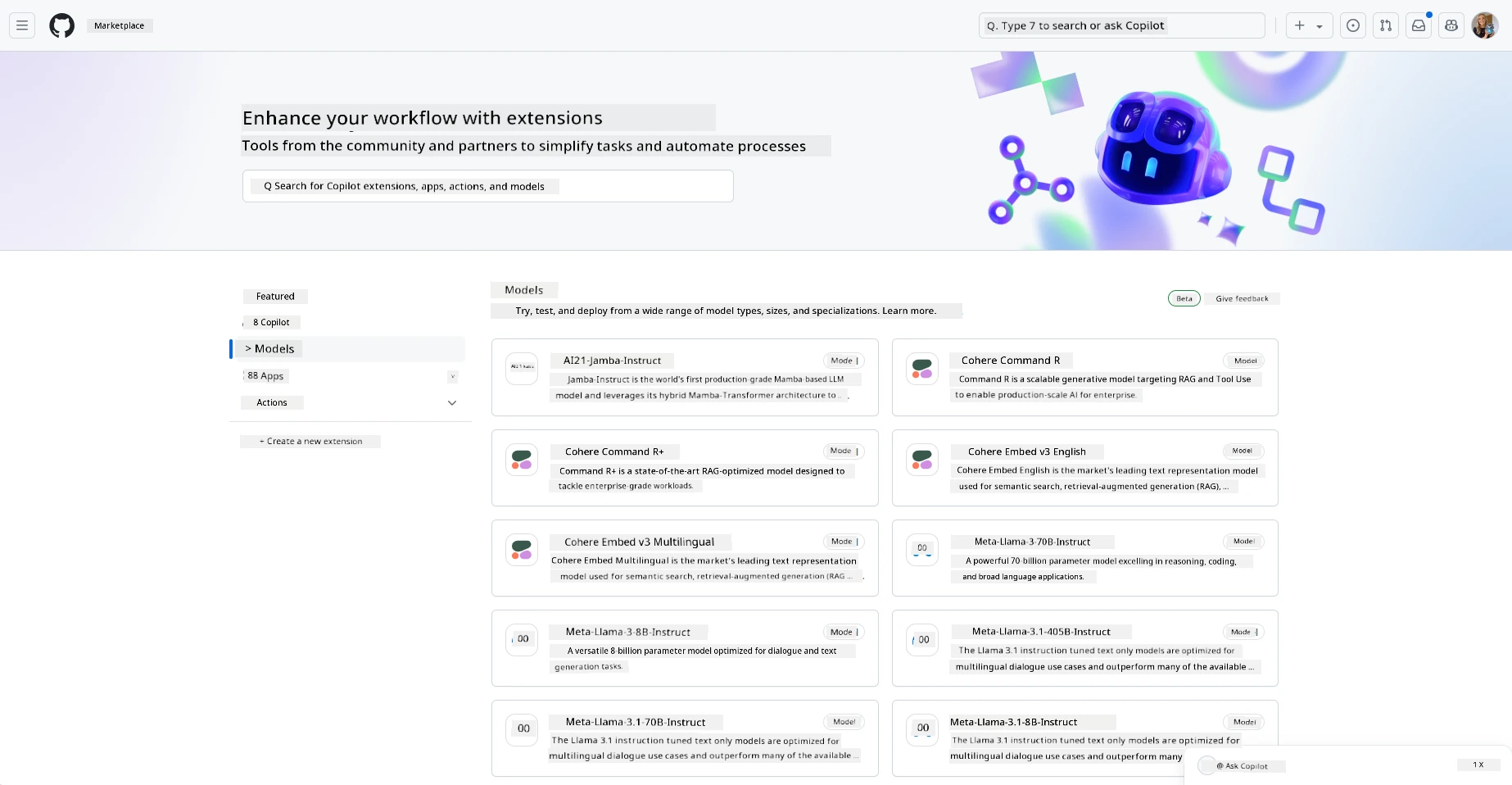
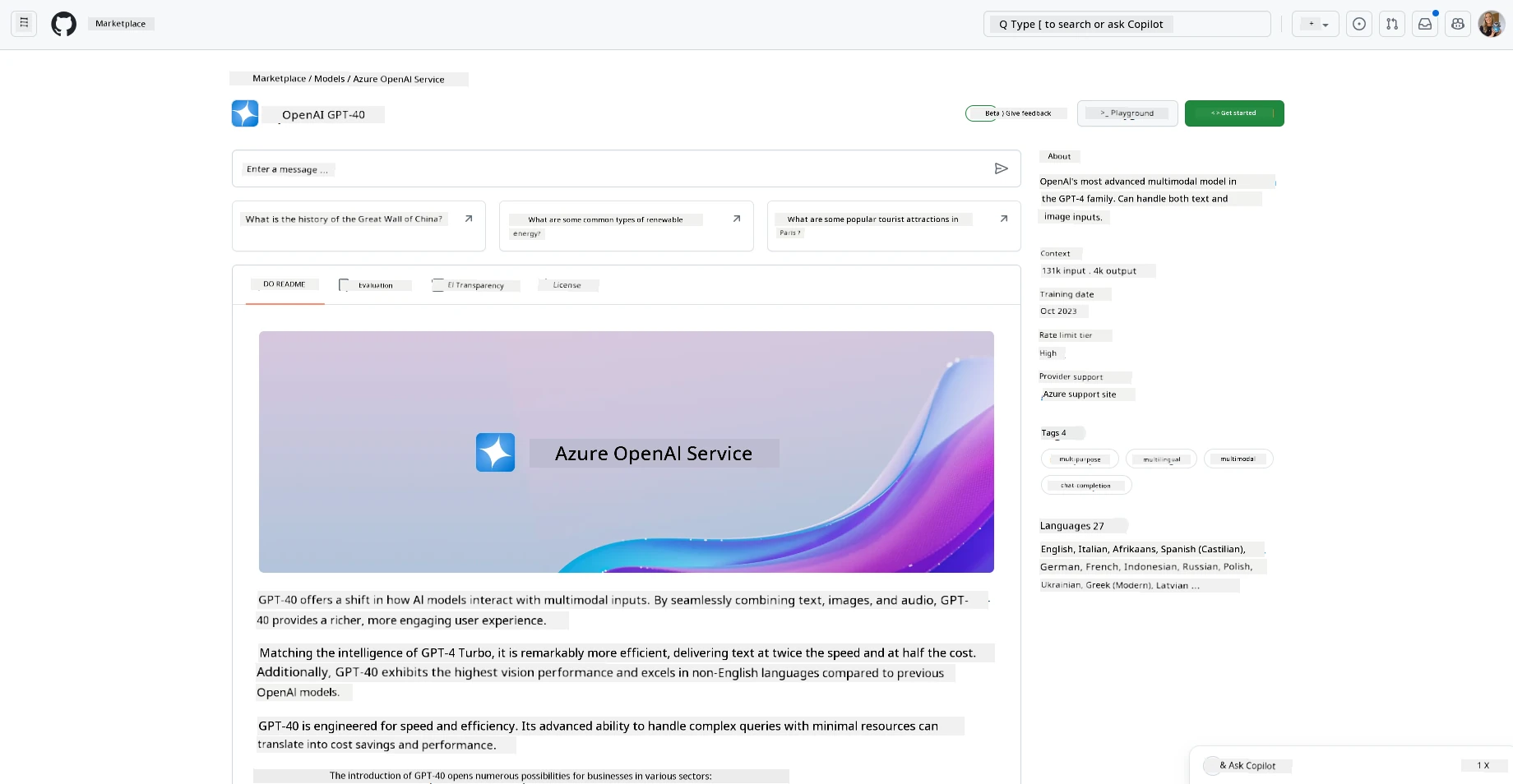
Choose a model - for example OpenAI GPT-4o mini
Here you will see the model card. You can:
- Read details about the model in the readme, benchmarks, and license tabs
- Deploy the model to your Foundry project
- Once deployed, interact with the model directly in the playground
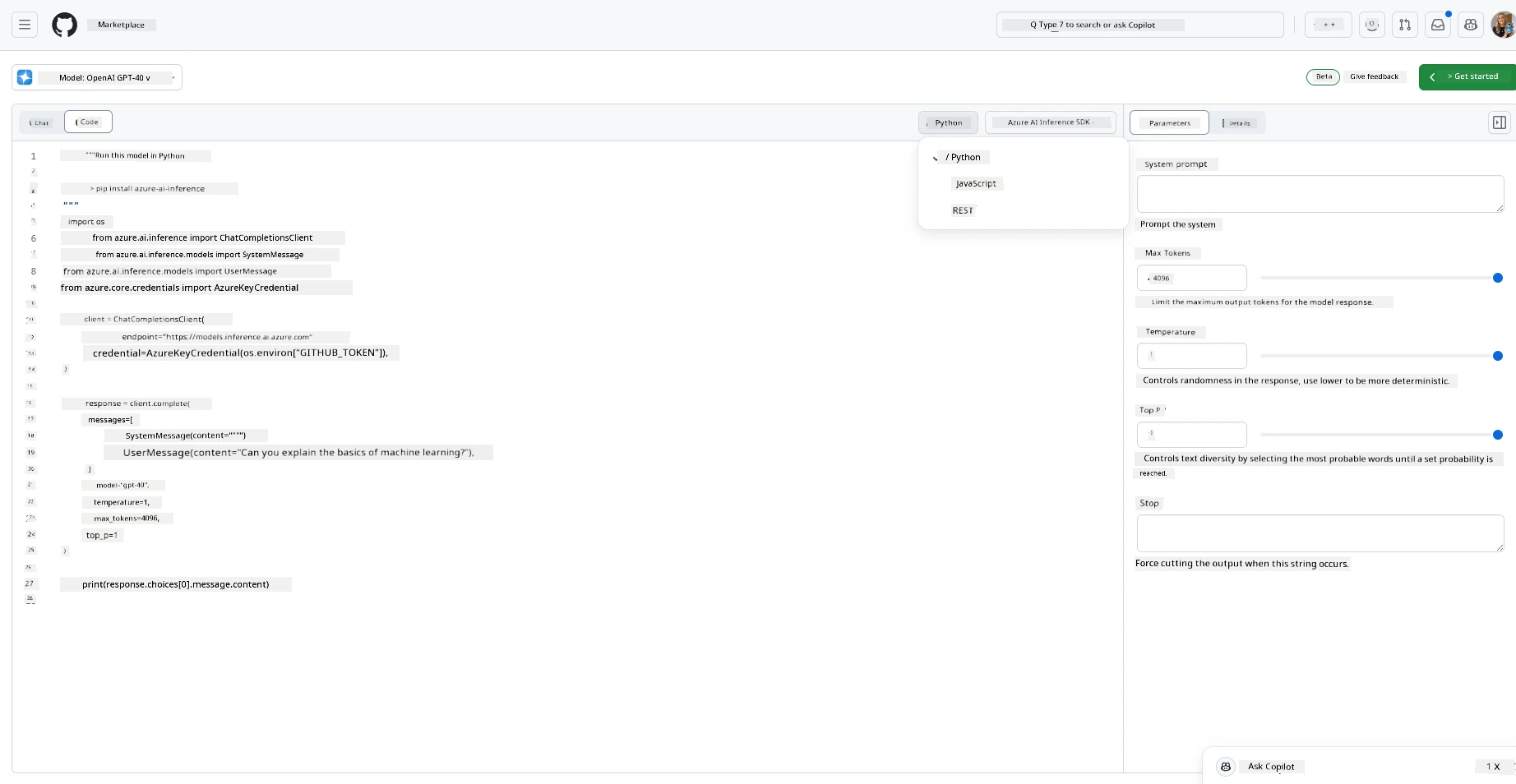
Open the Playground to interact with the model, add system prompts and change parameter details - and also get all the code you need to run this from anywhere, in Python, JavaScript, C#, and REST.
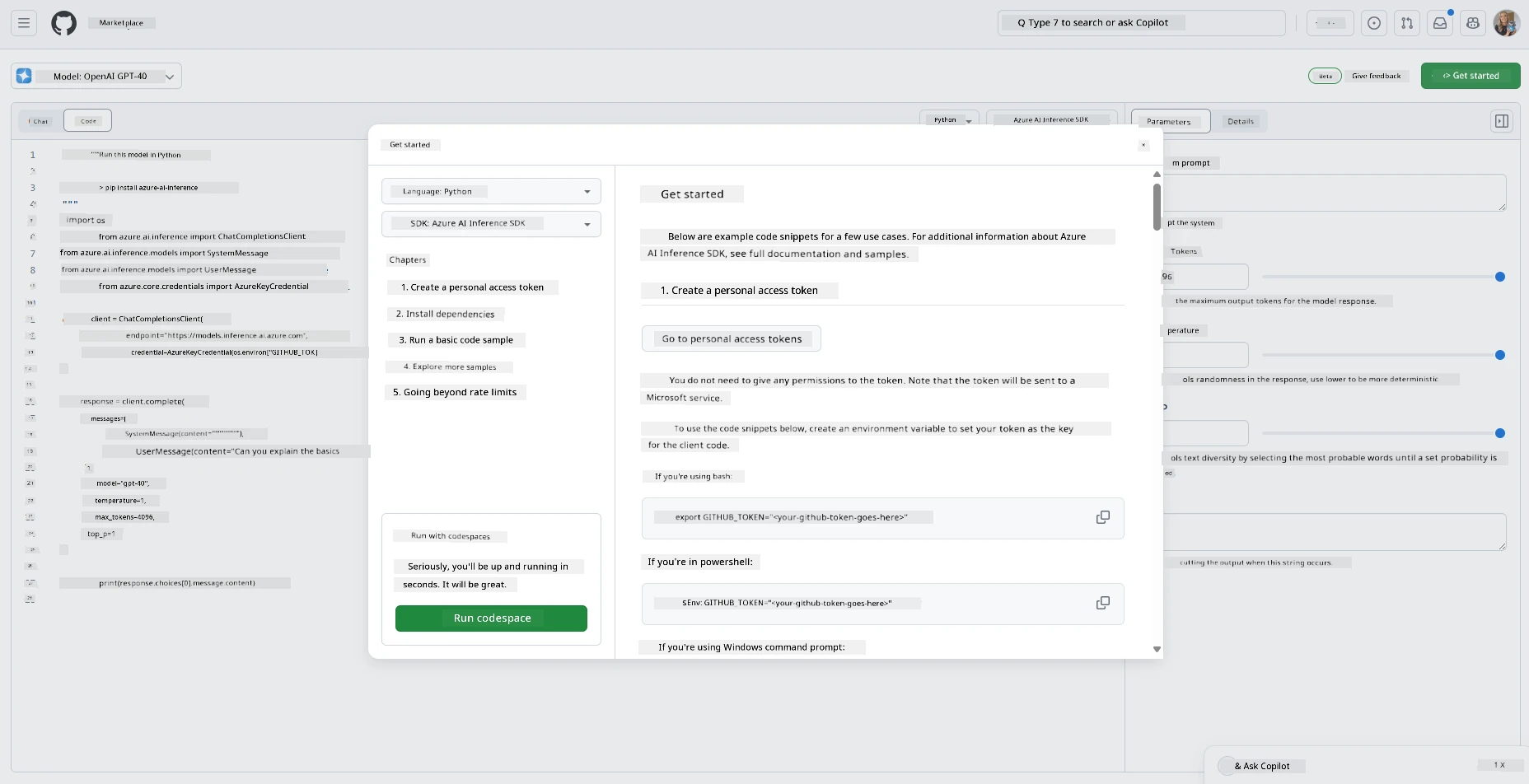
Lets use the model in our own IDE
Two options here:
- GitHub Codespaces - seamless integration with Codespaces
- VS Code (or any favorite IDE) - you'll need the endpoint and API key from your Foundry project
Either way, you'll find these values on the Overview page of your Foundry project.
1.Codespaces
- Create a new codespace (or use an existing)
- VS Code will open in your browser with a set of sample notebooks in multiple languages you can try
- Run the sample
./githubmodels-app.py.
Note: In codespaces, save your Foundry endpoint and key as Codespaces secrets so you don't have to set them locally.
Now move to 'Generate Text' section below to continue this assignment
2. VS Code (or any favorite IDE)
From your Microsoft Foundry project you have all the information you need to run in your favorite IDE. This example will show VS Code
- Deploy a chat model in your Foundry project. This lesson's temperature examples use a Llama model such as
Llama-3.3-70B-Instruct, because reasoning models likegpt-5-minidon't supporttemperature/top_p. - Copy the project's endpoint and API key from the Overview page
- Create environment variables to store them:
AZURE_INFERENCE_ENDPOINTandAZURE_INFERENCE_CREDENTIAL- samples available in bash, powershell and windows command prompt - Install dependencies:
pip install azure-ai-inference - Copy basic sample code into a .py file
- navigate to where your code is saved and run the file:
python filename.py
Don't forget by using the Azure AI Inference SDK, you can easily experiment with different models by modifying the value of model_name in the code.
The following models are available in the Microsoft Foundry Models catalog:
- OpenAI: gpt-4o, gpt-5-mini, gpt-4.1, gpt-4.1-mini, o3-mini, text-embedding-3-large, text-embedding-3-small
- Meta: Meta-Llama-3.1-405B-Instruct, Meta-Llama-3.1-70B-Instruct, Meta-Llama-3.1-8B-Instruct, Llama-3.2-11B-Vision-Instruct, Llama-3.2-90B-Vision-Instruct, Llama-4-Scout-17B-16E-Instruct
- Mistral AI: Mistral-large-2411, Mistral-small-2503, Codestral-2501, Ministral-3B
- Microsoft: Phi-4, Phi-4-mini-instruct, Phi-4-multimodal-instruct, Phi-4-reasoning
- Cohere: Cohere-command-r-plus-08-2024, Cohere-embed-v3-multilingual, Cohere-embed-v3-english
- DeepSeek: DeepSeek-V3, DeepSeek-R1
Now move to 'Generate Text' section below to continue this assignment
Generate text with ChatCompletions
The way to generate text is to use the ChatCompletionsClient class.
In samples/python/azure_ai_inference/basic.py, in the response section of code, update the code the user role by changing the content parameter to below:
response = client.complete(
    messages=[
        {
            "role": "system",
            "content": "You are a helpful assistant.",
        },
        {
            "role": "user",
            "content": "Complete the following: Once upon a time there was a",
        },
    ],
    model=model_name,
    # Optional parameters
    temperature=1.,
    max_tokens=1000,
    top_p=1.
)
Run the updated file to see the output
Different types of prompts, for different things
Now you've seen how to generate text using a prompt. You even have a program up and running that you can modify and change to generate different types of text.
Prompts can be used for all sorts of tasks. For example:
- Generate a type of text. For example, you can generate a poem, questions for a quiz etc.
- Lookup information. You can use prompts to look for information like the following example 'What does CORS mean in web development?'.
- Generate code. You can use prompts to generate code, for example developing a regular expression used to validate emails or why not generate an entire program, like a web app?
Exercise: a recipe generator
Imagine you have ingredients at home and you want to cook something. For that, you need a recipe. A way to find recipes is to use a search engine or you could use an LLM to do so.
You could write a prompt like so:
"Show me 5 recipes for a dish with the following ingredients: chicken, potatoes, and carrots. Per recipe, list all the ingredients used"
Given the above prompt, you might get a response similar to:
1. Roasted Chicken and Vegetables:
Ingredients:
- 4 chicken thighs
- 2 potatoes, cut into cubes
- 2 carrots, cut into cubes
- 2 tablespoons olive oil
- 2 cloves garlic, minced
- 1 teaspoon dried thyme
- 1 teaspoon dried oregano
- Salt and pepper, to taste

2. Chicken and Potato Stew:
Ingredients:
- 2 tablespoons olive oil
- 1 onion, diced
- 2 cloves garlic, minced
- 2 chicken breasts, cut into cubes
- 2 potatoes, cut into cubes
- 2 carrots, cut into cubes
- 1 teaspoon dried oregano
- 1 teaspoon dried thyme
- 1 cup chicken broth
- Salt and pepper, to taste

3. Chicken and Potato Bake:
Ingredients:
- 2 tablespoons olive oil
- 2 chicken breasts, cut into cubes
- 2 potatoes, cut into cubes
- 2 carrots, cut into cubes
- 1 onion, diced
- 2 cloves garlic, minced
- 1 teaspoon dried oregano
- 1 teaspoon dried thyme
- 1 cup chicken broth
- Salt and pepper, to taste

4. Chicken and Potato Soup:
Ingredients:
- 2 tablespoons olive oil
- 1 onion, diced
- 2 cloves garlic, minced
- 2 chicken breasts, cut into cubes
- 2 potatoes, cut into cubes
- 2 carrots, cut into cubes
- 1 teaspoon dried oregano
- 1 teaspoon dried thyme
- 4 cups chicken broth
- Salt and pepper, to taste

5. Chicken and Potato Hash:
Ingredients:
- 2 tablespoons olive oil
- 2 chicken breasts, cut into cubes
- 2 potatoes, cut into cubes
- 2 carrots, cut into cubes
- 1 onion, diced
- 2 cloves garlic, minced
- 1 teaspoon dried oregano
This outcome is great, I know what to cook. At this point, what could be useful improvements are:
- Filtering out ingredients I don't like or am allergic to.
- Produce a shopping list, in case I don't have all the ingredients at home.
For the above cases, let's add an additional prompt:
"Please remove recipes with garlic as I'm allergic and replace it with something else. Also, please produce a shopping list for the recipes, considering I already have chicken, potatoes and carrots at home."
Now you have a new result, namely:
1. Roasted Chicken and Vegetables:
Ingredients:
- 4 chicken thighs
- 2 potatoes, cut into cubes
- 2 carrots, cut into cubes
- 2 tablespoons olive oil
- 1 teaspoon dried thyme
- 1 teaspoon dried oregano
- Salt and pepper, to taste

2. Chicken and Potato Stew:
Ingredients:
- 2 tablespoons olive oil
- 1 onion, diced
- 2 chicken breasts, cut into cubes
- 2 potatoes, cut into cubes
- 2 carrots, cut into cubes
- 1 teaspoon dried oregano
- 1 teaspoon dried thyme
- 1 cup chicken broth
- Salt and pepper, to taste

3. Chicken and Potato Bake:
Ingredients:
- 2 tablespoons olive oil
- 2 chicken breasts, cut into cubes
- 2 potatoes, cut into cubes
- 2 carrots, cut into cubes
- 1 onion, diced
- 1 teaspoon dried oregano
- 1 teaspoon dried thyme
- 1 cup chicken broth
- Salt and pepper, to taste

4. Chicken and Potato Soup:
Ingredients:
- 2 tablespoons olive oil
- 1 onion, diced
- 2 chicken breasts, cut into cubes
- 2 potatoes, cut into cubes
- 2 carrots, cut into cubes
- 1 teaspoon dried oregano
- 1 teaspoon dried thyme
- 4 cups chicken broth
- Salt and pepper, to taste

5. Chicken and Potato Hash:
Ingredients:
- 2 tablespoons olive oil
- 2 chicken breasts, cut into cubes
- 2 potatoes, cut into cubes
- 2 carrots, cut into cubes
- 1 onion, diced
- 1 teaspoon dried oregano

Shopping List:
- Olive oil
- Onion
- Thyme
- Oregano
- Salt
- Pepper
That's your five recipes, with no garlic mentioned and you also have a shopping list considering what you already have at home.
Exercise - build a recipe generator
Now that we have played out a scenario, let's write code to match the demonstrated scenario. To do so, follow these steps:
- Use the existing file as a starting point
- Create a
promptvariable and change the sample code as below:
import os
from azure.ai.inference import ChatCompletionsClient
from azure.ai.inference.models import SystemMessage, UserMessage
from azure.core.credentials import AzureKeyCredential

# Get these from your Microsoft Foundry project's "Overview" page
token = os.environ["AZURE_INFERENCE_CREDENTIAL"]
endpoint = os.environ["AZURE_INFERENCE_ENDPOINT"]

# temperature/top_p need a non-reasoning model (gpt-5 rejects them), so use a Llama model here.
model_name = os.environ.get("AZURE_INFERENCE_CHAT_MODEL", "Llama-3.3-70B-Instruct")

client = ChatCompletionsClient(
    endpoint=endpoint,
    credential=AzureKeyCredential(token),
)

prompt = "Show me 5 recipes for a dish with the following ingredients: chicken, potatoes, and carrots. Per recipe, list all the ingredients used"

response = client.complete(
    messages=[
        {
            "role": "system",
            "content": "You are a helpful assistant.",
        },
        {
            "role": "user",
            "content": prompt,
        },
    ],
    model=model_name,
    # Optional parameters
    temperature=1.,
    max_tokens=1000,
    top_p=1.
)

print(response.choices[0].message.content)
If you now run the code, you should see an output similar to:
### Recipe 1: Classic Chicken Stew
#### Ingredients:
- 2 lbs chicken thighs or drumsticks, skinless
- 4 cups chicken broth
- 4 medium potatoes, peeled and diced
- 4 large carrots, peeled and sliced
- 1 large onion, chopped
- 2 cloves garlic, minced
- 2 celery stalks, sliced
- 1 tsp dried thyme
- 1 tsp dried rosemary
- Salt and pepper to taste
- 2 tbsp olive oil
- 2 tbsp flour (optional, for thickening)

### Recipe 2: Chicken and Vegetable Roast
#### Ingredients:
- 4 chicken breasts or thighs
- 4 medium potatoes, cut into wedges
- 4 large carrots, cut into sticks
- 1 large onion, cut into wedges
- 3 cloves garlic, minced
- 1/4 cup olive oil
- 1 tsp paprika
- 1 tsp dried oregano
- Salt and pepper to taste
- Juice of 1 lemon
- Fresh parsley, chopped (for garnish)
(continued ...)
NOTE, your LLM is nondeterministic, so you might get different results every time you run the program.
Great, let's see how we can improve things. To improve things, we want to make sure the code is flexible, so ingredients and number of recipes can be improved and changed.
- Let's change the code in the following way:
import os
from azure.ai.inference import ChatCompletionsClient
from azure.ai.inference.models import SystemMessage, UserMessage
from azure.core.credentials import AzureKeyCredential

# Get these from your Microsoft Foundry project's "Overview" page
token = os.environ["AZURE_INFERENCE_CREDENTIAL"]
endpoint = os.environ["AZURE_INFERENCE_ENDPOINT"]

# temperature/top_p need a non-reasoning model (gpt-5 rejects them), so use a Llama model here.
model_name = os.environ.get("AZURE_INFERENCE_CHAT_MODEL", "Llama-3.3-70B-Instruct")

client = ChatCompletionsClient(
    endpoint=endpoint,
    credential=AzureKeyCredential(token),
)

no_recipes = input("No of recipes (for example, 5): ")

ingredients = input("List of ingredients (for example, chicken, potatoes, and carrots): ")

# interpolate the number of recipes into the prompt an ingredients
prompt = f"Show me {no_recipes} recipes for a dish with the following ingredients: {ingredients}. Per recipe, list all the ingredients used"

response = client.complete(
    messages=[
        {
            "role": "system",
            "content": "You are a helpful assistant.",
        },
        {
            "role": "user",
            "content": prompt,
        },
    ],
    model=model_name,
    # Optional parameters
    temperature=1.,
    max_tokens=1000,
    top_p=1.
)

print(response.choices[0].message.content)
Taking the code for a test run, could look like this:
No of recipes (for example, 5): 2
List of ingredients (for example, chicken, potatoes, and carrots): milk, strawberries

Sure! Here are two recipes featuring milk and strawberries:

### Recipe 1: Strawberry Milkshake

#### Ingredients:
- 1 cup milk
- 1 cup strawberries, hulled and sliced
- 2 tablespoons sugar (optional, to taste)
- 1/2 teaspoon vanilla extract
- 5-6 ice cubes

#### Instructions:
1. Combine the milk, strawberries, sugar (if using), and vanilla extract in a blender.
2. Blend on high until smooth and creamy.
3. Add the ice cubes and blend again until the ice is fully crushed and the milkshake is frothy.
4. Pour into a glass and serve immediately.

### Recipe 2: Strawberry Panna Cotta

#### Ingredients:
- 1 cup milk
- 1 cup strawberries, hulled and pureed
- 1/4 cup sugar
- 1 teaspoon vanilla extract
- 1 envelope unflavored gelatin (about 2 1/2 teaspoons)
- 2 tablespoons cold water
- 1 cup heavy cream

#### Instructions:
1. Sprinkle the gelatin over the cold water in a small bowl and let it stand for about 5-10 minutes to soften.
2. In a saucepan, combine the milk, heavy cream, and sugar. Cook over medium heat, stirring frequently until the sugar is dissolved and the mixture begins to simmer. Do not let it boil.
3. Remove the saucepan from the heat and stir in the softened gelatin until completely dissolved.
4. Stir in the vanilla extract and allow the mixture to cool slightly.
5. Divide the mixture evenly into serving cups or molds and refrigerate for at least 4 hours or until set.
6. To prepare the strawberry puree, blend the strawberries until smooth.
7. Once the panna cotta is set, spoon the strawberry puree over the top of each panna cotta.
8. Serve chilled.

Enjoy these delightful recipes!
Improve by adding filter and shopping list
We now have a working app capable of producing recipes and it's flexible as it relies on inputs from the user, both on the number of recipes but also the ingredients used.
To further improve it, we want to add the following:
-
Filter out ingredients. We want to be able to filter out ingredients we don't like or are allergic to. To accomplish this change, we can edit our existing prompt and add a filter condition to the end of it like so:
In [8] filter = input("Filter (for example, vegetarian, vegan, or gluten-free: ") prompt = f"Show me {no_recipes} recipes for a dish with the following ingredients: {ingredients}. Per recipe, list all the ingredients used, no {filter}"Above, we add
{filter}to the end of the prompt and we also capture the filter value from the user.An example input of running the program can now look like so:
In [9] No of recipes (for example, 5): 2 List of ingredients (for example, chicken, potatoes, and carrots): onion, milk Filter (for example, vegetarian, vegan, or gluten-free: no milk Certainly! Here are two recipes using onion but omitting milk: ### Recipe 1: Caramelized Onions #### Ingredients: - 4 large onions, thinly sliced - 2 tablespoons olive oil - 1 tablespoon butter - 1 teaspoon salt - 1 teaspoon sugar (optional) - 1 tablespoon balsamic vinegar (optional) #### Instructions: 1. Heat the olive oil and butter in a large skillet over medium heat until the butter is melted. 2. Add the onions and stir to coat them with the oil and butter mixture. 3. Add salt (and sugar if using) to the onions. 4. Cook the onions, stirring occasionally, for about 45 minutes to an hour until they are golden brown and caramelized. 5. If using, add balsamic vinegar during the last 5 minutes of cooking. 6. Remove from heat and serve as a topping for burgers, steak, or as a side dish. ### Recipe 2: French Onion Soup #### Ingredients: - 4 large onions, thinly sliced - 3 tablespoons unsalted butter - 2 cloves garlic, minced - 1 teaspoon sugar - 1 teaspoon salt - 1/4 cup dry white wine (optional) - 4 cups beef broth - 4 cups chicken broth - 1 bay leaf - 1 teaspoon fresh thyme, chopped (or 1/2 teaspoon dried thyme) - 1 baguette, sliced - 2 cups Gruyère cheese, grated #### Instructions: 1. Melt the butter in a large pot over medium heat. 2. Add the onions, garlic, sugar, and salt, and cook, stirring frequently, until the onions are deeply caramelized (about 30-35 minutes). 3. If using, add the white wine and cook until it evaporates, about 3-5 minutes. 4. Add the beef and chicken broths, bay leaf, and thyme. Bring to a simmer and cook for another 30 minutes. Remove the bay leaf. 5. Preheat the oven to 400°F (200°C). 6. Place the baguette slices on a baking sheet and toast them in the preheated oven until golden brown, about 5 minutes. 7. Ladle the soup into oven-safe bowls and place a slice of toasted baguette on top of each bowl. 8. Sprinkle the grated Gruyère cheese generously over the baguette slices. 9. Place the bowls under the broiler until the cheese is melted and bubbly, about 3-5 minutes. 10. Serve hot. Enjoy your delicious onion dishes! -
Produce a shopping list. We want to produce a shopping list, considering what we already have at home.
For this functionality, we could either try to solve everything in one prompt or we could split it up into two prompts. Let's try the latter approach. Here we're suggesting adding an additional prompt, but for that to work, we need to add the result of the former prompt as context to the latter prompt.
Locate the part in the code that prints out the result from the first prompt and add the following code below:
In [10] old_prompt_result = response.choices[0].message.content prompt = "Produce a shopping list for the generated recipes and please don't include ingredients that I already have." new_prompt = f"{old_prompt_result} {prompt}" response = client.complete( messages=[ { "role": "system", "content": "You are a helpful assistant.", }, { "role": "user", "content": new_prompt, }, ], model=model_name, # Optional parameters temperature=1., max_tokens=1200, top_p=1. ) # print response print("Shopping list:") print(response.choices[0].message.content)Note the following:
-
We're constructing a new prompt by adding the result from the first prompt to the new prompt:
In [11] new_prompt = f"{old_prompt_result} {prompt}" messages = [{"role": "user", "content": new_prompt}] -
We make a new request, but also considering the number of tokens we asked for in the first prompt, so this time we say
max_tokensis 1200. A word on token length. We should consider how many tokens we need to generate the text we want. Tokens cost money, so where possible, we should try to be economical with the number of tokens we use. For example, can we phrase the prompt so that we can use less tokens?In [12] response = client.complete( messages=[ { "role": "system", "content": "You are a helpful assistant.", }, { "role": "user", "content": new_prompt, }, ], model=model_name, # Optional parameters temperature=1., max_tokens=1200, top_p=1. )Taking this code for a spin, we now arrive at the following output:
In [13] No of recipes (for example, 5): 1 List of ingredients (for example, chicken, potatoes, and carrots): strawberry, milk Filter (for example, vegetarian, vegan, or gluten-free): nuts Certainly! Here's a simple and delicious recipe for a strawberry milkshake using strawberry and milk as primary ingredients: ### Strawberry Milkshake #### Ingredients: - 1 cup fresh strawberries, hulled - 1 cup cold milk - 1 tablespoon honey or sugar (optional, to taste) - 1/2 teaspoon vanilla extract (optional) - 3-4 ice cubes #### Instructions: 1. Wash and hull the strawberries, then slice them in half. 2. In a blender, combine the strawberries, cold milk, honey or sugar (if using), vanilla extract (if using), and ice cubes. 3. Blend until smooth and frothy. 4. Pour the milkshake into a glass. 5. Serve immediately and enjoy your refreshing strawberry milkshake! This recipe is nut-free and makes for a delightful and quick treat! Shopping list: Sure! Here’s the shopping list for the Strawberry Milkshake recipe based on the ingredients provided. Please adjust based on what you already have at home: ### Shopping List: - Fresh strawberries (1 cup) - Milk (1 cup) Optional: - Honey or sugar (1 tablespoon) - Vanilla extract (1/2 teaspoon) - Ice cubes (3-4) Feel free to omit the optional ingredients if you prefer or if you already have them on hand. Enjoy your delicious strawberry milkshake!
-
-
Experimenting with temperature. Temperature is something we haven't mentioned so far but is an important context for how our program performs. The higher the temperature value the more random the output will be. Conversely the lower the temperature value the more predictable the output will be. Consider whether you want variation in your output or not.
To alter the temperature, you can use the
temperatureparameter. For example, if you want to use a temperature of 0.5, you would do:
    response = client.complete(
        messages=[
            {
                "role": "system",
                "content": "You are a helpful assistant.",
            },
            {
                "role": "user",
                "content": new_prompt,
            },
        ],
        model=model_name,
        # Optional parameters
        temperature=0.5,
        max_tokens=1200,
        top_p=1.
    )
Note, the closer to 1.0, the more varied the output.
Assignment
For this assignment, you can choose what to build.
Here are some suggestions:
- Tweak the recipe generator app to improve it further. Play around with temperature values, and the prompts to see what you can come up with.
- Build a "study buddy". This app should be able to answer questions about a topic for example Python, you could have prompts like "What is a certain topic in Python?", or you could have a prompt that says, show me code for a certain topic etc.
- History bot, make history come alive, instruct the bot to play a certain historical character and ask it questions about its life and times.
Solution
Study buddy
-
"You're an expert on the Python language
Suggest a beginner lesson for Python in the following format:
Format:
- concepts:
- brief explanation of the lesson:
- exercise in code with solutions"
Above is a starter prompt, see how you can use it and tweak it to your liking.
History bot
Here's some prompts you could be using:
-
"You are Abe Lincoln, tell me about yourself in 3 sentences, and respond using grammar and words like Abe would have used"
-
"You are Abe Lincoln, respond using grammar and words like Abe would have used:
Tell me about your greatest accomplishments, in 300 words:"
Knowledge check
What does the concept temperature do?
- It controls how random the output is.
- It controls how big the response is.
- It controls how many tokens are used.
A: 1
What's a good way to store secrets like API keys?
- In code.
- In a file.
- In environment variables.
A: 3, because environment variables are not stored in code and can be loaded from the code.
Disclaimer: This document has been translated using AI translation service Co-op Translator. While we strive for accuracy, please be aware that automated translations may contain errors or inaccuracies. The original document in its native language should be considered the authoritative source. For critical information, professional human translation is recommended. We are not liable for any misunderstandings or misinterpretations arising from the use of this translation.