Source: Aoai Assignment · GitHub · microsoft/generative-ai-for-beginners Authors: Microsoft (microsoft) Licence: MIT — https://spdx.org/licenses/MIT.html
Introduction
This lesson will cover:
- What is function calling and its use cases
- How to create a function call using Azure OpenAI
- How to integrate a function call into an application
Learning Goals
After completing this lesson you will know how to and understand:
- The purpose of using function calling
- Setup Function Call using the Azure OpenAI Service
- Design effective function calls for your application's use case
Understanding Function Calls
For this lesson, we want to build a feature for our education startup that allows users to use a chatbot to find technical courses. We will recommend courses that fit their skill level, current role and technology of interest.
To complete this we will use a combination of:
Azure Open AIto create a chat experience for the userMicrosoft Learn Catalog APIto help users find courses based on the request of the userFunction Callingto take the user's query and send it to a function to make the API request.
To get started, let's look at why we would want to use function calling in the first place:
Why Function Calling
If you have completed any other lesson in this course, you probably understand the power of using Large Language Models (LLMs). Hopefully you can also see some of their limitations as well.
Function Calling is a feature of the Azure Open AI Service to overcome the following limitations:
- Consistent response format
- Ability to use data from other sources of an application in a chat context
Before function calling, responses from an LLM were unstructured and inconsistent. Developers were required to write complex validation code to make sure they are able to handle each variation of a response.
Users could not get answers like "What is the current weather in Stockholm?". This is because models were limited to the time the data was trained on.
Let's look at the example below that illustrates this problem:
Let's say we want to create a database of student data so we can suggest the right course to them. Below we have two descriptions of students that are very similar in the data they contain.
student_1_description="Emily Johnson is a sophomore majoring in computer science at Duke University. She has a 3.7 GPA. Emily is an active member of the university's Chess Club and Debate Team. She hopes to pursue a career in software engineering after graduating."

student_2_description = "Michael Lee is a sophomore majoring in computer science at Stanford University. He has a 3.8 GPA. Michael is known for his programming skills and is an active member of the university's Robotics Club. He hopes to pursue a career in artificial intelligence after finishing his studies."
We want to send this to an LLM to parse the data. This can later be used in our application to send this to an API or store it in a database.
Let's create two identical prompts that we instruct the LLM on what information that we are interested in:
We want to send this to an LLM to parse the parts that are important to our product. So we can create two identical prompts to instruct the LLM:
prompt1 = f'''
Please extract the following information from the given text and return it as a JSON object:

name
major
school
grades
club

This is the body of text to extract the information from:
{student_1_description}
'''


prompt2 = f'''
Please extract the following information from the given text and return it as a JSON object:

name
major
school
grades
club

This is the body of text to extract the information from:
{student_2_description}
'''
After creating these two prompts, we will send them to the LLM by using client.responses.create. We store the prompt in the input variable and assign the role to user. This is to mimic a message from a user being written to a chatbot.
import os
import json
from openai import OpenAI
from dotenv import load_dotenv
load_dotenv()

# The OpenAI client points at the Azure OpenAI (Microsoft Foundry) /openai/v1/ endpoint
client = OpenAI(
  api_key=os.environ['AZURE_OPENAI_API_KEY'],
  base_url=f"{os.environ['AZURE_OPENAI_ENDPOINT'].rstrip('/')}/openai/v1/",
  )

deployment=os.environ['AZURE_OPENAI_DEPLOYMENT']
Now we can send both requests to the LLM and examine the response we receive.
openai_response1 = client.responses.create(
 model=deployment,
 input = [{'role': 'user', 'content': prompt1}],
 store=False,
)
openai_response1.output_text
openai_response2 = client.responses.create(
 model=deployment,
 input = [{'role': 'user', 'content': prompt2}],
 store=False,
)
openai_response2.output_text
# Loading the response as a JSON object
json_response1 = json.loads(openai_response1.output_text)
json_response1
# Loading the response as a JSON object
json_response2 = json.loads(openai_response2.output_text)
json_response2
Even though the prompts are the same and the descriptions are similar, we can get different formats of the Grades property.
If you run the above cell multiple times, the format can be 3.7 or 3.7 GPA.
This is because the LLM takes unstructured data in the form of the written prompt and returns also unstructured data. We need to have a structured format so that we know what to expect when storing or using this data
By using functional calling, we can make sure that we receive structured data back. When using function calling, the LLM does not actually call or run any functions. Instead, we create a structure for the LLM to follow for its responses. We then use those structured responses to know what function to run in our applications.
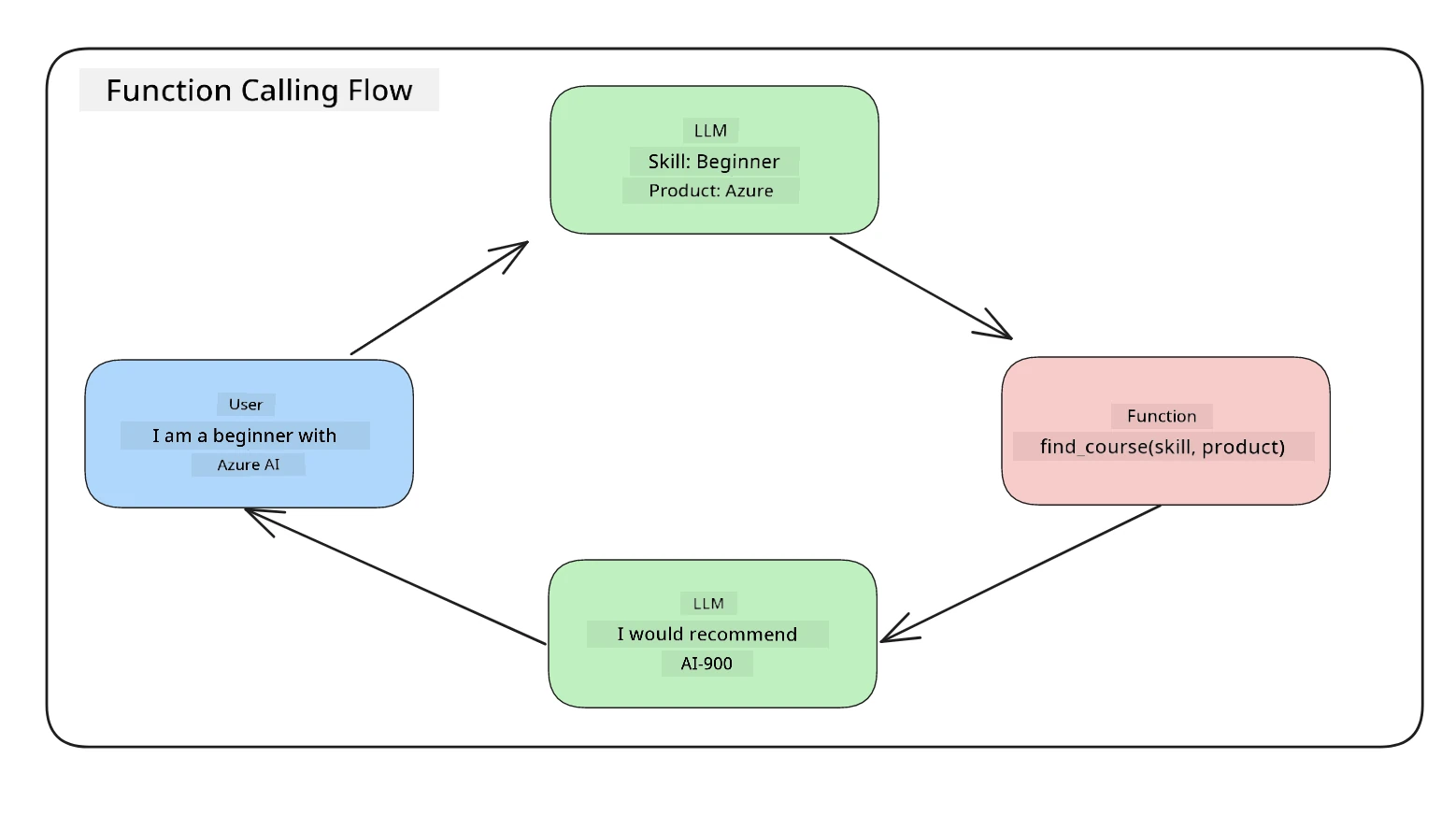
We can then take what is returned from the function and send this back to the LLM. The LLM will then respond using natural language to answer the user's query.
Use Cases for using function calls
Calling External Tools
Chatbots are great at providing answers to questions from users. By using function calling, the chatbots can use messages from users to complete certain tasks. For example, a student can ask the chatbot to "Send email to my instructor saying I need more assistance with this subject". This can make a function call to send_email(to: string, body: string)
Create API or Database Queries
Users can find information using natural language that gets converted into a formatted query or API request. An example of this could be a teacher who requests "Who are the students that completed the last assignment" which could call a function named get_completed(student_name: string, assignment: int, current_status: string)
Creating Structured Data
Users can take a block of text or CSV and use the LLM to extract important information from it. For example, a student can convert a Wikipedia article about peace agreements to create AI flash cards. This can be done by using a function called get_important_facts(agreement_name: string, date_signed: string, parties_involved: list)
2. Creating Your First Function Call
The process of creating a function call includes 3 main steps:
- Calling the Chat Completions API with a list of your functions and a user message
- Read the model's response to perform an action ie execute a function or API Call
- Make another call to Chat Completions API with the response from your function to use that information to create a response to the user.
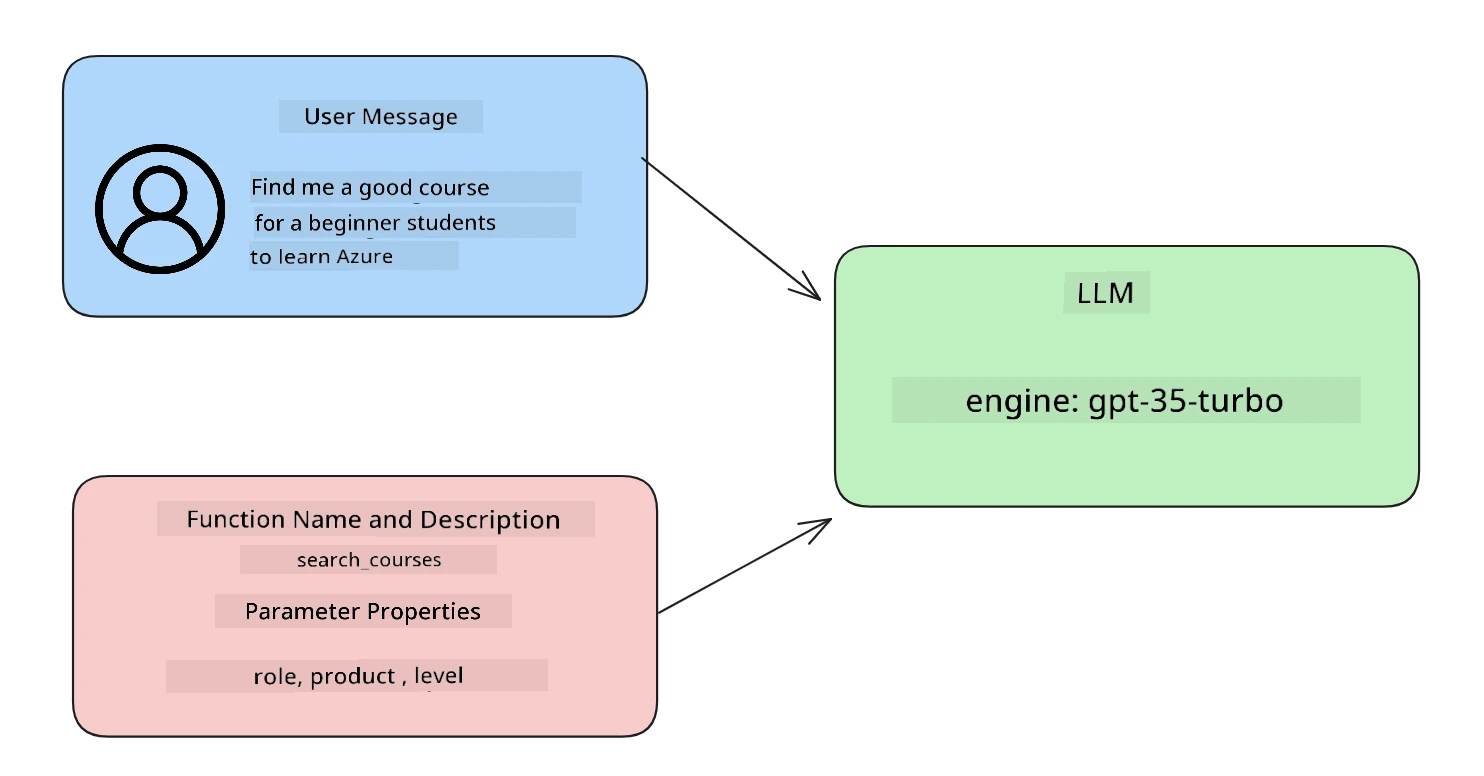
Elements of a function call
Users Input
The first step is to create a user message. This can be dynamically assigned by taking the value of a text input or you can assign a value here. If this is your first time working with the Chat Completions API, we need to define the role and the content of the message.
The role can be either system (creating rules), assistant (the model) or user (the end-user). For function calling, we will assign this as user and an example question.
messages= [ {"role": "user", "content": "Find me a good course for a beginner student to learn Azure."} ]
Creating functions.
Next we will define a function and the parameters of that function. We will use just one function here called search_courses but you can create multiple functions.
Important : Functions are included in the system message to the LLM and will be included in the amount of available tokens you have available.
# The Responses API uses a flat tool format: name/description/parameters at the top level
functions = [
   {
      "type":"function",
      "name":"search_courses",
      "description":"Retrieves courses from the search index based on the parameters provided",
      "parameters":{
         "type":"object",
         "properties":{
            "role":{
               "type":"string",
               "description":"The role of the learner (i.e. developer, data scientist, student, etc.)"
            },
            "product":{
               "type":"string",
               "description":"The product that the lesson is covering (i.e. Azure, Power BI, etc.)"
            },
            "level":{
               "type":"string",
               "description":"The level of experience the learner has prior to taking the course (i.e. beginner, intermediate, advanced)"
            }
         },
         "required":[
            "role"
         ]
      }
   }
]
Definitions
name - The name of the function that we want to have called.
description - This is the description of how the function works. Here it's important to be specific and clear
parameters - A list of values and format that you want the model to produce in its response
type - The data type of the properties will be stored in
properties - List of the specific values that the model will use for its response
name - the name of the property that the model will use in its formatted response
type - The data type of the this property
description - Description of the specific property
Optional
required - required property for the function call to be completed
Making the function call
After defining a function, we now need to include it in the call to the Chat Completion API. We do this by adding functions to the request. In this case functions=functions.
There is also an option to set function_call to auto. This means we will let the LLM decide which function should be called based on the user message rather than assigning it ourselves.
response = client.responses.create(model=deployment,
                                        input=messages,
                                        tools=functions,
                                        tool_choice="auto",
                                        store=False)

print(response.output)
Now let's look at the response and see how it is formatted:
{ "role": "assistant", "function_call": { "name": "search_courses", "arguments": "{\n "role": "student",\n "product": "Azure",\n "level": "beginner"\n}" } }
You can see that the name of the function is called and from the user message, the LLM was able to find the data to fit the arguments of the function.
3.Integrating Function Calls into an Application.
After we have tested the formatted response from the LLM, now we can integrate this into an application.
Managing the flow
To integrate this into our application, let's take the following steps:
First, let's make the call to the Open AI services and store the message in a variable called response_message.
# Extract the function call items from the response output
tool_calls = [item for item in response.output if item.type == "function_call"]
Now we will define the function that will call the Microsoft Learn API to get a list of courses:
import requests

def search_courses(role, product, level):
    url = "https://learn.microsoft.com/api/catalog/"
    params = {
        "role": role,
        "product": product,
        "level": level
    }
    response = requests.get(url, params=params)
    modules = response.json()["modules"]
    results = []
    for module in modules[:5]:
        title = module["title"]
        url = module["url"]
        results.append({"title": title, "url": url})
    return str(results)
As a best practice, we will then see if the model wants to call a function. After that, we will create one of the available functions and match it to the function that is being called. We will then take the arguments of the function and map them to arguments of from the LLM.
Lastly, we will append the function call message and the values that were returned by the search_courses message. This gives the LLM all the information it needs to
respond to the user using natural language.
# Check if the model wants to call a function
if tool_calls:
    tool_call = tool_calls[0]
    print("Recommended Function call:")
    print(tool_call.name)
    print()

    # Call the function.
    function_name = tool_call.name

    available_functions = {
            "search_courses": search_courses,
    }
    function_to_call = available_functions[function_name]

    function_args = json.loads(tool_call.arguments)
    function_response = function_to_call(**function_args)

    print("Output of function call:")
    print(function_response)
    print(type(function_response))


    # Add the model's function call item(s) and our function result to the conversation.
    # The Responses API represents tool results as `function_call_output` items.
    messages.extend(response.output)  # adding the model's function_call item(s)
    messages.append( # adding function response to messages
        {
            "type": "function_call_output",
            "call_id": tool_call.call_id,
            "output": function_response,
        }
    )
Now we will send the updated message to the LLM so we can receive a natural language response instead of an API JSON formatted response.
print("Messages in next request:")
print(messages)
print()

second_response = client.responses.create(
    input=messages,
    model=deployment,
    tools=functions,
    tool_choice="auto",
    store=False,
        )  # get a new response from the model where it can see the function response


print(second_response.output_text)
Code Challenge
Great work! To continue your learning of Azure Open AI Function Calling you can build: https://learn.microsoft.com/training/support/catalog-api-developer-reference?WT.mc_id=academic-105485-koreyst
- More parameters of the function that might help learners find more courses. You can find the available API parameters here:
- Create another function call that takes more information from the learner like their native language
- Create error handling when the function call and/or API call does not return any suitable courses
Disclaimer: This document has been translated using AI translation service Co-op Translator. While we strive for accuracy, please be aware that automated translations may contain errors or inaccuracies. The original document in its native language should be considered the authoritative source. For critical information, professional human translation is recommended. We are not liable for any misunderstandings or misinterpretations arising from the use of this translation.